
Why Does My Breaker Keep Tripping? (And How to Fix It)
The living room power went out. No lights, no TV, nothing. I checked the breaker panel and sure enough, one breaker had flipped to the off position.
I reset it. It tripped again immediately.
I reset it again. Same thing – instant trip. Something was wrong, and I had no idea what.
That’s the frustration of a breaker that keeps tripping. You know where the problem is – sort of. The breaker is telling you there’s an issue. But it’s not telling you what that issue is or how to fix it.
This is the story of how I troubleshot that problem, replaced the breaker, and discovered the issue wasn’t the breaker at all – it was a smart light bulb with an extra contact point causing a short circuit.
Quick Answer
Circuit breakers trip to protect your home from three main problems: overloaded circuits, short circuits, or ground faults. If your breaker keeps tripping after you reset it, the troubleshooting process is systematic – turn off the breaker, unplug everything on that circuit, reset the breaker, then add devices back one at a time until you identify what’s causing the trip. Sometimes the breaker itself has failed and needs replacement. But often the problem isn’t the breaker – it’s a faulty device or appliance on that circuit.
⚠️ Affiliate Disclosure:
Some of the tools mentioned here include affiliate links. If you click and buy, we may earn a small commission, at no extra cost to you. We only recommend gear we’d actually use ourselves
What Circuit Breakers Do (And Why They Trip)
Before you can fix a tripping breaker, you need to understand what it’s protecting against.
A circuit breaker is a safety device that monitors electrical current flowing through a circuit. When something goes wrong, the breaker trips and cuts power to prevent damage, fire, or electrocution.
Three Reasons Breakers Trip
Overloaded Circuit: You’re drawing more current than the circuit is rated for. A 15-amp breaker will trip if you’re pulling more than 15 amps. This happens when too many devices are plugged into outlets on the same circuit.
Short Circuit: A hot wire touches a neutral wire or ground wire directly, creating a path of almost no resistance. Current surges instantly, and the breaker trips to prevent wires from overheating and starting a fire.
Ground Fault: Current leaks from a hot wire to ground through an unintended path – often through damaged insulation, water, or a person. GFCI outlets protect against this in wet areas, but standard breakers also detect severe ground faults.
When your breaker trips, it’s doing its job. It’s protecting your home from electrical problems that could cause fires or injury. The trip isn’t the problem – it’s the symptom. Your job is to find the cause.
Understanding Circuit Breakers
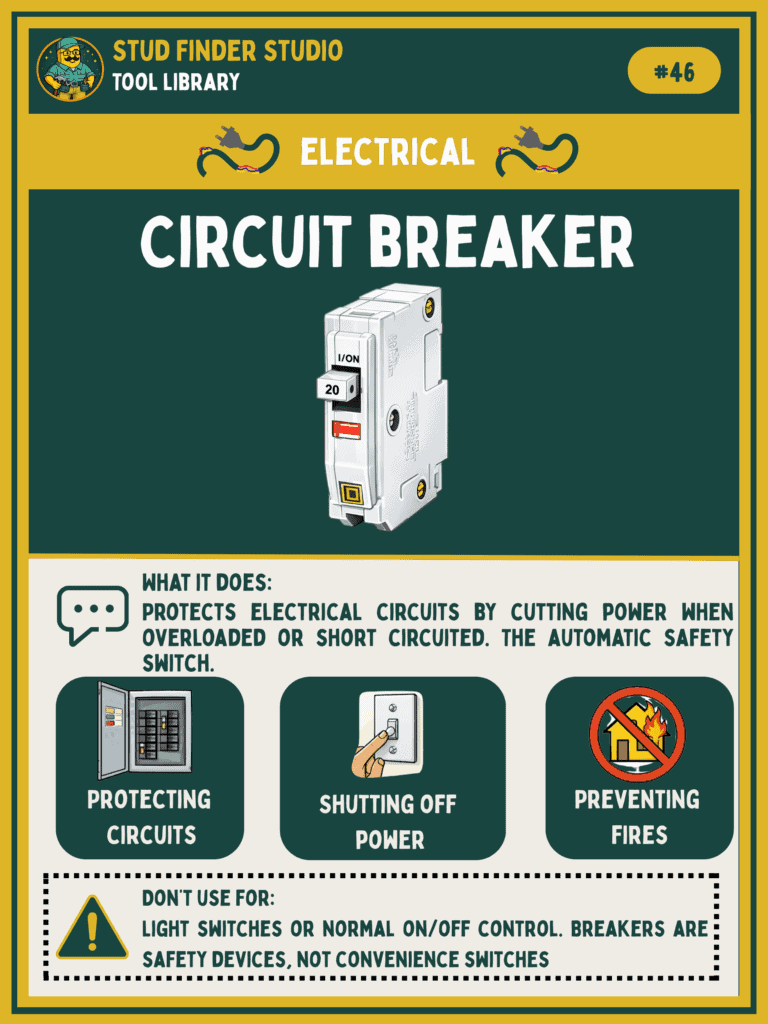
What it is: Safety switch that automatically cuts power when it detects overload, short circuit, or ground fault
How it works: Monitors current flow through a circuit and trips when current exceeds safe limits
When to replace: Breaker won’t stay reset, feels hot, shows visible damage, or trips frequently without cause
Types: Standard (15A, 20A), GFCI, AFCI (arc-fault), and dual-function breakers
Location: Main electrical panel, usually in basement, garage, or utility room
Want to learn more about essential electrical tools and home safety equipment? Check out our Tool Reference Library for detailed guides.
Common Causes of Tripping Breakers
Overloaded Circuit
This is the most common cause. You’re asking a circuit to deliver more power than it’s designed to handle.
A 15-amp circuit can safely deliver about 1,800 watts. If you plug in a space heater (1,500 watts), a TV (200 watts), and a lamp (100 watts) all on the same circuit, you’re at 1,800 watts – right at the limit. Add one more device and the breaker trips.
Kitchen circuits trip often because people run multiple high-wattage appliances simultaneously – microwave, toaster, coffee maker. Each individually is fine, but together they exceed the circuit capacity.
Short Circuit
This is more dangerous than an overload. A short circuit happens when a hot wire touches a neutral wire or ground wire directly, bypassing the normal load.
This creates almost no resistance, so current surges to dangerous levels instantly. The breaker trips immediately to prevent the wires from melting and starting a fire.
Short circuits are caused by damaged wire insulation, loose connections, faulty switches or outlets, or internal appliance failures.
Ground Fault
Similar to a short circuit, but current leaks to ground through an unintended path. This might be through damaged wire insulation touching a metal box, through water that’s contacted a live wire, or through any other path that allows current to flow to ground.
Ground faults are especially dangerous because that unintended path might be through a person touching a faulty appliance.
Bad Breaker
Circuit breakers wear out. The internal mechanism that trips the breaker can fail from age, repeated trips, or poor quality manufacturing.
A failing breaker might trip at lower currents than it’s rated for, or it might not stay in the reset position even when there’s nothing wrong with the circuit.
Faulty Device on the Circuit
Sometimes a single device has an internal fault – damaged cord, short inside the device, or bad wiring. That device trips the breaker every time it’s plugged in, even though the breaker and the circuit wiring are fine.
This was my problem, though I didn’t know it yet.
How to Troubleshoot a Tripping Breaker
When my living room breaker kept tripping, I knew I needed a systematic approach to find the cause.
Step 1: Reset and Observe
First, try resetting the breaker once with everything still plugged in. If it stays reset, the problem might have been temporary – a power surge, a momentary overload, or something that resolved itself.
If it trips again immediately, you’ve got a persistent problem. That’s what happened to me – instant trip, every time.
Step 2: Turn Off the Breaker and Unplug Everything
Go to every outlet on that circuit and unplug every device. Unplug everything – lamps, TVs, chargers, everything. If you have any hardwired devices on that circuit (like a ceiling fan or garbage disposal), turn them off at their wall switches.
Step 3: Reset the Breaker With Nothing Connected
With everything unplugged, reset the breaker. If it stays reset, the problem is one of the devices you unplugged. The breaker and the circuit wiring are fine.
If it trips even with nothing plugged in, the problem is either the breaker itself or a fault in the circuit wiring. That requires either replacing the breaker or calling an electrician to trace the wiring fault.
In my case, the breaker stayed reset with everything unplugged. The circuit wiring was fine. The problem was something I’d unplugged.
Step 4: Add Devices Back One at a Time
This is the tedious but effective part. Plug in one device. If the breaker stays reset, that device is fine. Unplug it and try the next device.
Keep going until you plug something in and the breaker trips. You’ve found your culprit.
Step 5: My Discovery – The Smart Bulb Short
I went through every device in my living room. TV – fine. Lamp – tripped the breaker.
Found it. The lamp was the problem.
But here’s where it got interesting. The lamp itself was fine. It was a smart bulb I’d installed in the lamp. The smart bulb had an extra contact point that was touching something inside the lamp socket and creating a short circuit.
Every time I plugged the lamp in, that short circuit tripped the breaker instantly.
I didn’t figure this out immediately, though. First, I went through the process of replacing the breaker itself.
How to Replace a Circuit Breaker
I assumed the breaker was bad. It made sense – the lamp had worked fine for months with that smart bulb, so why would it suddenly start tripping the breaker?
I went to the hardware store and matched the breaker by looking at the side of my breaker panel and at other breakers in the box. Circuit breakers are brand-specific – you need the right brand and amperage for your panel.
Safety Warning: Main Power Off
Before you open your breaker panel and touch any breakers, you need to turn off the main breaker. This is the large breaker at the top of your panel that controls power to the entire panel.
If you’re not comfortable doing this, or if your panel doesn’t have a main breaker disconnect, call an electrician. Working inside a live breaker panel is dangerous.
The Replacement Process
With the main power off, I removed the panel cover. Most covers are held on by screws around the perimeter.
I located the breaker that had been tripping. I took a photo of how it was wired before disconnecting anything – this makes reinstallation easier.
I loosened the wire terminal screw and pulled the wire free from the old breaker. Then I unclipped the breaker from the bus bar (the metal strip it snaps onto) and removed it.
The new breaker snapped onto the bus bar in the same position. I connected the wire to the terminal screw on the new breaker, making sure it was tight and secure.
With the new breaker installed, I replaced the panel cover and turned the main breaker back on.
Using a Voltage Tester for Safety
Before and after working in the breaker panel, I used a non-contact voltage tester to confirm power was off and then back on. This is a simple tool that detects voltage without touching bare wires – it beeps or lights up when voltage is present.
A voltage tester is essential for electrical work. It’s the only way to confirm power is actually off before you touch wires. They cost $15-25 and are worth every penny for the safety they provide.
The Breaker Still Tripped
I reset the new breaker. I plugged the lamp back in.
The breaker tripped immediately.
The problem wasn’t the breaker. The breaker was doing exactly what it was supposed to do – detecting a fault and protecting the circuit. I’d just spent money and time replacing a breaker that was working correctly.
The fault was in the lamp.
When It’s NOT the Breaker
This is the lesson I learned: a tripping breaker doesn’t mean a bad breaker. It means something on that circuit is drawing too much current or creating a fault.
I examined the lamp more carefully. I removed the smart bulb and tested the lamp with a standard bulb. It worked fine.
I looked at the smart bulb. It had a slightly different contact design than a standard bulb, with an extra metal contact point visible on the base. That extra contact point was touching the lamp socket in a way that created a short to ground.
The solution was simple: I ordered a lamp adapter designed for smart bulbs. It provided proper spacing and contact alignment. Once I installed the adapter, the smart bulb worked perfectly and the breaker stayed reset.
The entire problem came down to one bulb in one lamp having an incompatible contact design. Everything else on the circuit was fine. The breaker was fine. The wiring was fine.
But without systematic troubleshooting, I never would have found it.
When to Call an Electrician
Replacing a circuit breaker is within the capabilities of most DIYers if you follow safety protocols – main power off, voltage tester to confirm, careful wire connections. I watched several YouTube videos before attempting it and felt confident in the process.
But there are situations where calling an electrician is the better choice.
Multiple Breakers Tripping
If several breakers trip at once, or if different breakers trip repeatedly without a clear pattern, you might have a problem with your main panel or service entrance. This requires professional diagnosis.
Main Breaker Trips
If your main breaker trips, cutting power to your entire house, don’t attempt to troubleshoot this yourself. A main breaker trip indicates a serious problem that needs professional attention.
Burning Smell or Visible Damage
If you smell burning plastic or see any signs of melting, charring, or damage in your breaker panel, don’t touch it. Turn off the main breaker if you can do so safely, and call an electrician immediately.
No Obvious Cause After Troubleshooting
If you’ve unplugged everything, the breaker still trips, and you’ve ruled out the breaker itself by testing or replacement, you likely have a wiring fault somewhere in your walls. Tracing wiring faults requires tools and expertise most homeowners don’t have.
Uncertainty About Panel Work
If you’re not confident working inside your breaker panel, don’t force it. Electrical panels contain enough voltage to kill you instantly. There’s no shame in hiring a professional for work that makes you uncomfortable.
Final Thoughts From Stud Finder Studio
A breaker that keeps tripping is frustrating, but it’s giving you information. It’s telling you something is wrong on that circuit, and your job is to figure out what.
The troubleshooting process is methodical. Unplug everything. Reset the breaker. Add devices back one at a time. When you find the device that trips it, you’ve found your answer.
Sometimes the answer surprises you. I replaced a perfectly good breaker before discovering the real problem was a smart bulb with an incompatible contact design. But that’s part of troubleshooting – following the process until you find the actual cause, even when it’s not what you expected.
The key lesson: respect what breakers are telling you. They trip for a reason. Don’t just keep resetting a tripping breaker and hoping it stops. Find the cause, fix it properly, and make sure your electrical system is safe.
That’s what breakers are for – keeping you safe. When they trip, they’re doing their job. Now you know how to do yours.
Related Articles You Might Find Helpful:
How to Stop a Running Toilet (And Why It Happens) – Common plumbing fix
How to Install a GFCI Outlet (And When You Need One) – Essential electrical safety
How to Replace a Light Switch (And Wire It Correctly) – Basic electrical DIY
Where Is My Main Water Shutoff Valve? (And Why You Should Find It Today) – Critical home safety