
Stop Losing Track
of Your Home Projects
One Google Sheet that tracks every project, every material, and every dollar. The dashboard updates itself.
Built by someone with a construction background. Designed for people who have never needed a system before.
Home Projects Are Expensive.
Disorganized Ones Cost Even More.
You start a project with a rough number in your head. Then the tile costs more than expected, the contractor invoice surprises you, and you cannot remember if you ordered the faucet. By the end, you have no idea what you actually spent.
Receipts and quotes scattered across texts, emails, and your kitchen counter
Going over budget because nothing was tracked in one place
Extra store runs because you forgot what was already ordered
Not knowing what the contractor has been paid or what is still owed
It is not your fault. Nobody hands you a system when you get the keys. The information exists, it just is not organized anywhere. That is what this fixes.
8 Tabs. One Complete System.
A done-for-you Google Sheets template where every tab connects to every other tab. Add your projects and materials once, and the rest updates automatically.
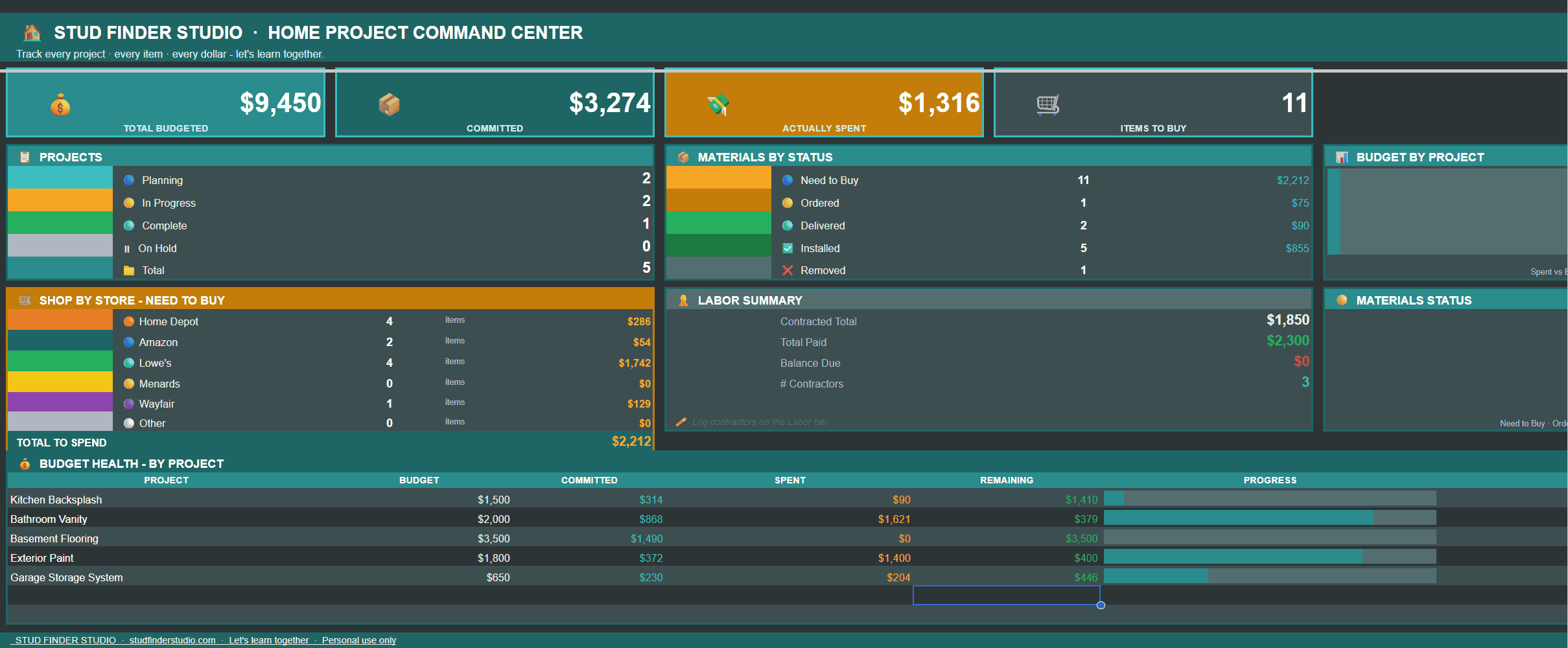
Live command center with KPI cards, budget health by project, a materials status chart, and a store breakdown. Updates as you enter data.
One row per project. Budget, dates, status, and actual spend pull automatically from your other tabs.
Paste any store URL and the store fills itself. Move items through status from Need to Buy all the way to Installed. Up to 500 items.
Populates itself from Materials. Every item you still need, grouped by store. Take it with you instead of making a separate list.
Log contractor quotes, deposits, and payments. Balance Due calculates automatically so nothing gets missed.
Budget vs. actual per project. Rows turn red when you are over budget and amber when you are getting close.
Gantt-style view of all your projects. Dates pull directly from Projects, nothing extra to enter.
Step-by-step guide built right into the sheet. You will be set up in under 5 minutes.
Set Up in Under 5 Minutes
No formulas to write. No complicated setup. Everything is already built.
Download and open in Google Sheets
Click “Make a copy” to save it to your Drive. Sample data is pre-loaded so you can see it working immediately.
Add your projects on the Projects tab
Give each project a name, a budget, and a short ID like P001. That ID connects everything across every tab automatically.
Log your materials as you shop
Paste any product URL and the store fills itself. Change the status as items move from ordered to delivered to installed.
Open the dashboard any time
Every number updates live from your data. Open it and know exactly where every project stands.
Everything You Need.
Nothing You Don’t.
Live Dashboard
Opens every session and tells you exactly where you stand across all projects.
- 4 live KPI cards
- Budget health with progress bars
- Materials status chart
- Store breakdown by dollar amount
Auto-Connected
Enter data once. Every other tab updates automatically.
- Store auto-detects from any URL
- Shop List builds itself
- Actual spend flows into Projects
- Labor payments update Budget
Built-In Smarts
Dropdowns, conditional formatting, and data validation throughout.
- Status dropdowns on every key column
- Rows turn red when over budget
- Strikethrough on removed items
- 500 material rows pre-formatted
Built for Real Projects
Construction background. Designed for actual home projects, not hypothetical ones.
- Sample data pre-loaded
- How to Use guide in the sheet
- Works on desktop and mobile
- Share with a partner in real time
Made for First-Timers.
Useful for Everyone.
This is for you if…
- You are a first-time homeowner figuring it out
- You rent and are doing upgrades or repairs
- You have more than one project going at once
- You have ever been surprised by a final bill
- You want one place for everything, not five apps
- You use Google Sheets or are willing to try
Probably not for you if…
- You only do one small project per year
- You already have a system that works
- You prefer a dedicated app over a spreadsheet

“I built this because I know what happens when the right information is not where you need it. No one should have to track home projects across five different apps and still end up lost. This is the system I wish existed.”
One Price. Yours Forever.
No subscription. No updates to pay for. Pay once and use it on every project you ever do.
- Full 8-tab Google Sheets template
- Sample data pre-loaded
- Built-in How to Use guide
- Lifetime access
- Share with anyone
- Full 8-tab Google Sheets template
- Sample data pre-loaded
- Built-in How to Use guide
- Lifetime access
- Share with anyone
Questions? ben@studfinderstudio.com
Frequently Asked
Your Next Project
Starts Here.
Stop tracking things in five different places. Get one sheet that handles everything.
Digital download only. For personal use only.

FROM THE STUDIO TO YOUR INBOX
A little more know-how.
New illustrated guides, useful tool cards, and practical homeowner tips. Get an email when we have something worth sharing.